Product Description
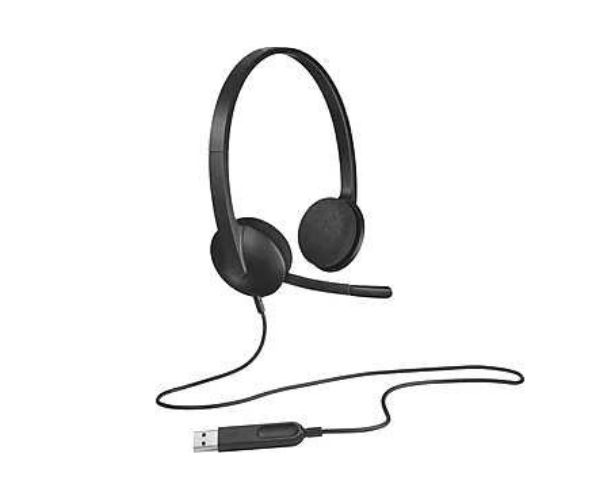
Discover the perfect blend of simplicity and performance with the brand new Logitech H340 USB Computer Headset. Whether you're on important business calls in Kampala, attending online classes, or just relaxing with your favourite music, this headset delivers high-quality digital stereo sound that brings your audio to life.
The H340 is incredibly easy to use. Just plug the USB-A connector into your computer and you're ready to go – no software installation needed! The noise-cancelling microphone is a fantastic feature; it reduces annoying background noise, ensuring your voice is heard clearly by colleagues, family, and friends. You can also rotate it out of the way when you're not using it.
Designed for comfort, the lightweight headband and soft foam ear cups allow you to wear it for hours without discomfort. It's the ideal, reliable audio solution for your everyday tasks, built with the quality Logitech is known for. Upgrade your computer's audio with this versatile and affordable headset today!
📖 HOW TO USE
1. Carefully unbox your brand new Logitech H340 headset.
2. Plug the USB-A connector directly into an available USB port on your laptop or desktop computer.
3. Your computer will automatically recognize the headset and install any necessary drivers.
4. Adjust the flexible headband for a comfortable and secure fit.
5. Position the noise-cancelling microphone on the left or right side, about two fingers' width from your mouth, for the clearest voice pickup.
💡 TIPS & CARE
• To avoid cable damage, do not wrap the cord tightly around the headset for storage.
• Gently wipe the ear cups and headband with a dry, soft cloth to keep them clean.
• For the best audio experience, ensure the headset is selected as your default input and output device in your computer's sound settings.
• Rotate the microphone boom up and out of the way when you are only listening to music or videos.