Product Description
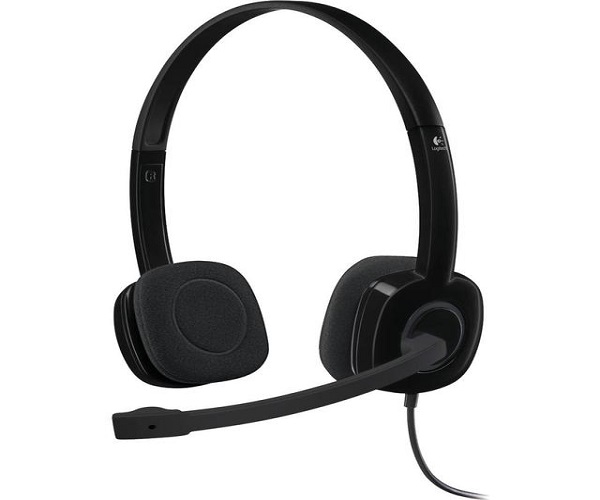
Experience clear and reliable audio with the BRAND NEW Logitech H151 Stereo Headset. Whether you're on an important business call on Zoom, catching up with family on WhatsApp, or enjoying your favorite music, this headset delivers full stereo sound for a crisp, immersive experience. It's the perfect audio companion for your daily tasks, designed for both work and leisure right here in Uganda.
The H151 features a smart noise-cancelling microphone that reduces annoying background noise, ensuring your voice is heard loud and clear. The microphone boom can be rotated 180° to be worn on either the left or right side, and you can tuck it away when you're not using it. Simple in-line controls on the cable let you easily adjust the volume or mute calls without any interruption. Built for comfort, it has an adjustable headband and soft foam ear cups for hours of comfortable use.
Getting started is incredibly easy. Just plug the single 3.5mm audio jack into your computer, tablet, or smartphone and it's ready to go instantly. This brand new, sealed headset is a simple, high-quality solution for anyone needing dependable audio for calls, online classes, or entertainment.
📖 HOW TO USE
1. Unbox your brand new Logitech H151 headset.
2. Plug the 3.5mm jack into the corresponding port on your computer, laptop, tablet, or smartphone.
3. Adjust the headband for a comfortable and secure fit on your head.
4. Position the rotating microphone boom on your preferred side (left or right) and adjust it to be near your mouth.
5. Use the in-line controls on the cable to adjust volume or mute the microphone as needed.
💡 TIPS & CARE
• For the clearest voice quality, position the microphone about two fingers' width from your mouth.
• Tuck the microphone boom away when you are only listening to music or watching videos.
• Keep the cable untangled to prevent damage to the internal wires.
• Clean the foam ear cups gently with a dry cloth to maintain hygiene.