Product Description
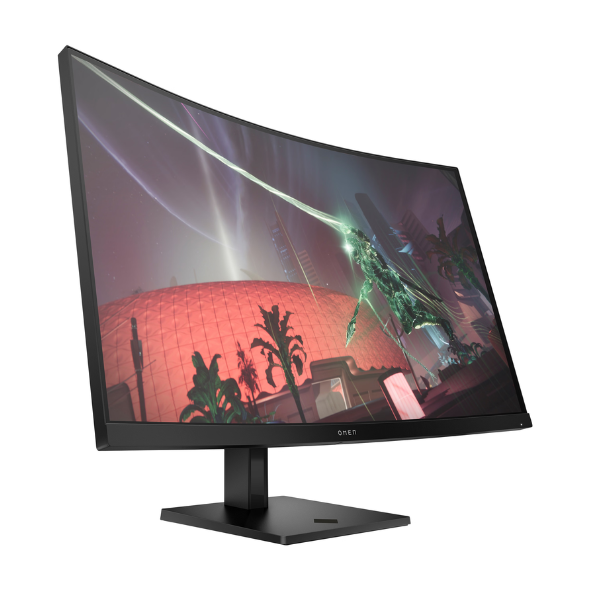
Step up your game with the brand new HP OMEN 32c Curved Gaming Monitor. This massive 31.5-inch display pulls you right into the action with its immersive 1500R curve and stunning QHD (2560 x 1440) resolution. Every detail is sharp, and every scene is expansive, giving you a competitive edge and a breathtaking visual experience for all your favorite games and movies. It's the perfect centerpiece for any serious gaming setup in Uganda.
Performance is everything in gaming, and the OMEN 32c delivers. A lightning-fast 165Hz refresh rate combined with a 1ms MPRT response time eliminates motion blur and ensures silky-smooth, fluid gameplay. You'll see the action the moment it happens, allowing for quicker reactions. With AMD FreeSync™ Premium technology, screen tearing and stuttering are a thing of the past, providing a seamless experience even during the most intense moments.
Built for long gaming sessions, this monitor features HP Eye Ease with Eyesafe® certified Low Blue Light technology, which reduces eye strain without sacrificing color accuracy. Connect your PC or console easily with HDMI and DisplayPort™ inputs. This isn't just a monitor; it's a brand new, sealed gateway to a more immersive and responsive gaming world, built to help you conquer the competition.
📖 HOW TO USE
1. Carefully unbox the monitor and all included components from the sealed packaging.
2. Attach the stand to the back of the monitor panel securely using the provided screws.
3. Connect the power adapter to the monitor and plug it into a wall socket.
4. Use the included DisplayPort™ or an HDMI cable to connect the monitor to your computer's graphics card or gaming console.
5. Power on the monitor and your device. Select the correct input source using the on-screen display (OSD) menu if needed.
💡 TIPS & CARE
• For the best performance, use a DisplayPort™ 1.4 cable to ensure you can achieve the full 165Hz refresh rate at QHD resolution.
• Enable AMD FreeSync™ Premium in both the monitor's settings menu and your graphics card's control panel for tear-free gaming.
• Adjust the monitor's height and tilt to find the most comfortable viewing angle for your seating position.
• Explore the OMEN Gaming Hub software to customize display settings, performance modes, and lighting effects.