Product Description
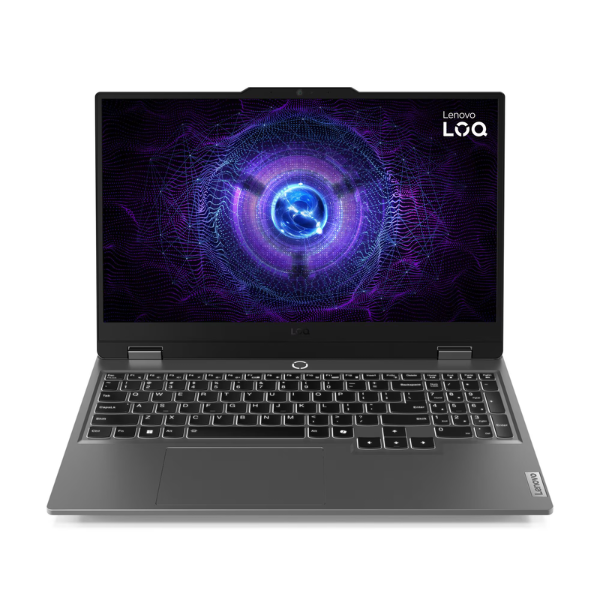
Unleash your true gaming potential with the brand new Lenovo LOQ 15IRX, a powerhouse designed for the modern gamer and creator in Uganda. At its heart is the formidable 13th Generation Intel Core i7-13650HX processor, paired with the cutting-edge NVIDIA GeForce RTX 4050 graphics card. This combination delivers breathtaking performance, allowing you to play the latest AAA titles at high settings, stream smoothly, and power through demanding creative applications like video editing and 3D rendering without breaking a sweat.
This machine is built for speed from the ground up. With 16GB of next-generation DDR5 RAM, multitasking is seamless. Switch between your game, a web browser, and Discord instantly. The super-fast 512GB NVMe SSD ensures that your system boots in seconds, games load in a flash, and file transfers are incredibly quick. An advanced cooling system with dual fans and multiple heat pipes works tirelessly to keep temperatures low, ensuring peak performance even during the most intense gaming marathons.
The immersive 15.6-inch Full HD display with a rapid 144Hz refresh rate provides a competitive edge, offering silky-smooth visuals and eliminating motion blur. Every detail is sharp and vibrant, bringing your games and content to life. The full-sized keyboard is responsive and comfortable for long sessions, while a comprehensive selection of ports ensures you can connect all your essential peripherals. This is a brand new, sealed unit, ready to dominate right out of the box.
📖 HOW TO USE
1. Carefully unbox the laptop and all included accessories.
2. Connect the power adapter to the laptop and plug it into a wall socket to begin charging.
3. Press the power button to turn on the laptop for the first time.
4. Follow the on-screen instructions to complete the initial Windows 11 setup.
5. Connect to your Wi-Fi network, install necessary software updates, and start installing your favorite games and applications.
💡 TIPS & CARE
• Always keep your NVIDIA graphics drivers updated for the best gaming performance and stability.
• For extended gaming sessions, use a laptop cooling pad to maintain optimal temperatures.
• Invest in a good quality gaming mouse and headset to complete your setup.
• Use Lenovo Vantage software to customize performance modes and system settings.