Product Description
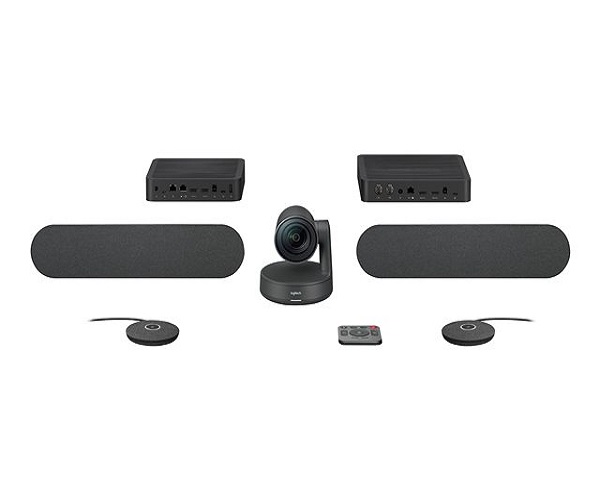
Elevate your business meetings to a new level of clarity and professionalism with the BRAND NEW Logitech Rally Plus. This all-in-one, modular video conferencing solution is designed for medium and large meeting spaces, providing everything you need for seamless, high-quality collaboration. Right out of the box, you get a premium system that impresses clients and empowers your team to communicate effectively.
The heart of the Rally Plus is its phenomenal Ultra-HD 4K PTZ (Pan-Tilt-Zoom) camera, which captures every detail with brilliant sharpness. Combined with Logitech's RightSense™ technologies, the camera automatically frames participants, controls exposure, and optimizes color for natural-looking skin tones, even in challenging lighting conditions. The modular audio system includes two powerful speakers for rich, room-filling sound and two highly sensitive mic pods that ensure every voice is heard clearly, thanks to RightSound™ technology that suppresses background noise and focuses on active speakers.
This system is not just powerful, it's intelligently designed. The Rally Plus kit includes a Table Hub and Display Hub to keep cables neat and organized, resulting in a clean, professional installation. It's incredibly easy to set up and works seamlessly with leading video conferencing platforms like Microsoft Teams, Zoom, and Google Meet. For Ugandan businesses looking to invest in reliable, future-proof communication tools, this brand new, sealed Logitech Rally Plus kit is the ultimate choice for making every meeting feel like you're in the same room.
📖 HOW TO USE
1. Carefully unpack all components: Rally Camera, 2 Speakers, 2 Mic Pods, Table Hub, Display Hub, and all connecting cables.
2. Connect the Rally Camera, Speakers, and Mic Pods to the appropriate ports on the Table Hub and Display Hub.
3. Connect the Display Hub to your meeting room screen(s) using an HDMI cable.
4. Connect the Table Hub to the meeting room PC or laptop via the provided USB-C cable.
5. Power on the system. Your computer will automatically detect the Rally Plus as a camera, speaker, and microphone. Select it in your conferencing software to begin your meeting.
💡 TIPS & CARE
• For the best audio coverage, place the Mic Pods centrally on the table where participants are seated.
• Mount the camera at eye level, either above or below the main display, for the most engaging video feed.
• Use the included remote control for manual pan, tilt, and zoom adjustments during a meeting.
• For very large rooms, purchase additional Rally Mic Pods to extend the audio pickup range and ensure everyone is heard.