Product Description
Discover the ultimate blend of power and flexibility with the BRAND NEW Lenovo IdeaPad 5 2-in-1 laptop. Designed for the modern professional and creative in Uganda, this device seamlessly transforms from a high-performance laptop to an intuitive tablet. Its sleek Storm Grey finish and premium build quality make it a stylish companion for work at the office, lectures at university, or relaxing at a cafe.
At its heart is a powerful Intel Core i7 processor, combined with a massive 16GB of RAM. This means you can multitask without any slowdowns – run demanding software like Adobe Photoshop, compile code, or have dozens of browser tabs open at once. The super-fast 512GB SSD ensures your laptop boots up in seconds and applications load instantly, saving you valuable time. Whether you're a business owner managing operations or a student working on a final year project, this laptop has the power you need to succeed.
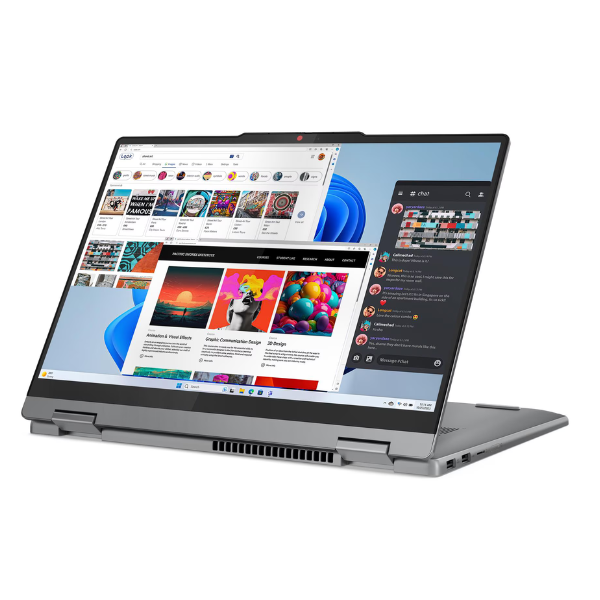
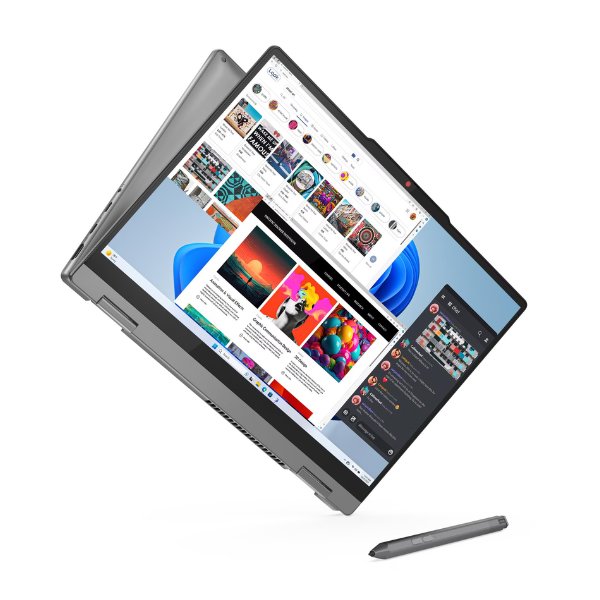
The star of the show is the stunning 14-inch OLED touchscreen. Experience true-to-life colours, deep blacks, and incredible contrast, making it perfect for watching movies, editing photos, or creating presentations that stand out. The 360° hinge allows you to use it in four modes: laptop, tent, stand, or tablet. Use it as a traditional laptop for typing, flip it to tent mode for watching videos on your flight, or fold it into a tablet for drawing and taking notes. This brand new, sealed laptop is your all-in-one solution for productivity and entertainment.
📖 HOW TO USE
1. Carefully unbox your brand new Lenovo IdeaPad and connect the included power adapter to begin charging.
2. Press the power button located on the side or keyboard deck to turn on the laptop.
3. Follow the on-screen Windows 11 setup guide to connect to your Wi-Fi network and personalize your settings.
4. Once setup is complete, install your essential software like Microsoft Office, web browsers, and other applications.
5. Explore the versatile 2-in-1 modes by rotating the screen 360 degrees to switch between laptop, tent, stand, and tablet configurations.
💡 TIPS & CARE
• Purchase a compatible active stylus to unlock the full potential of the touchscreen for note-taking and design work.
• Invest in a padded laptop sleeve or bag to protect your device from scratches and bumps when travelling around Kampala.
• Regularly check for and install Windows updates to ensure your laptop runs securely and efficiently.
• Use the built-in webcam privacy shutter for peace of mind during video calls and when the camera is not in use.