Product Description
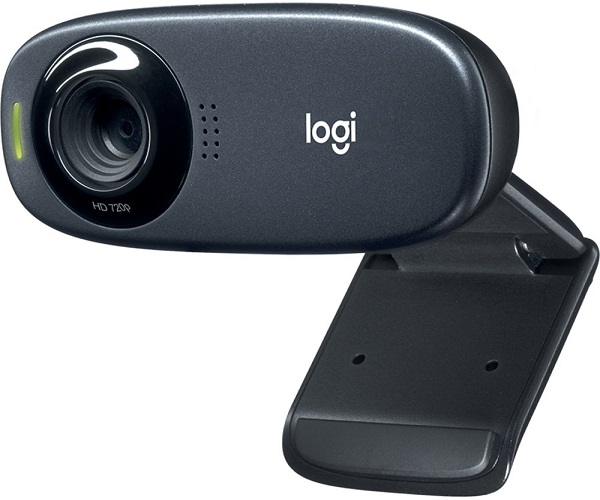
Upgrade your video calls and online meetings with the reliable and high-quality Logitech C310 HD Webcam. This brand new, sealed webcam delivers crisp HD 720p video, making you look sharp and professional whether you're on a Zoom call for work, catching up with family on WhatsApp, or attending online classes. Say goodbye to blurry, low-quality video forever!
The C310 isn't just about great video. It features a built-in microphone with noise reduction technology, ensuring your voice is heard clearly without annoying background noise. Even if you're in a busy room, your colleagues and loved ones will hear you, not the distractions. Plus, with Logitech's RightLight™ 2 feature, the camera intelligently adjusts to your lighting conditions, producing brighter, more contrasted images even in dim light. It's the perfect tool for anyone in Uganda needing a dependable webcam for work, school, or personal use.
Setting up is incredibly simple – just plug the USB cable into your computer and you're ready to go! The universal clip attaches securely to your laptop screen or external monitor, or you can even set it on a shelf. It's compatible with all popular video calling applications like Skype, Zoom, Google Meet, and more. Get this brand new Logitech C310 today and enjoy a superior video calling experience.
📖 HOW TO USE
1. Unbox your brand new Logitech C310 webcam.
2. Attach the webcam securely to the top of your laptop screen or computer monitor using the universal clip.
3. Plug the attached USB cable into an available USB port on your computer.
4. Your computer will automatically detect and install the necessary drivers.
5. Open your preferred video calling application (e.g., Zoom, Skype) and select the 'Logitech HD Webcam C310' as your video and audio device.
💡 TIPS & CARE
• For the best video quality, ensure you are in a well-lit area. Face a light source rather than having it behind you.
• Position the webcam at eye level for the most natural-looking video calls.
• Ensure you have a stable and fast internet connection for smooth, high-definition video streaming.
• Regularly wipe the lens with a soft, dry microfiber cloth to keep your video sharp and clear.