Product Description
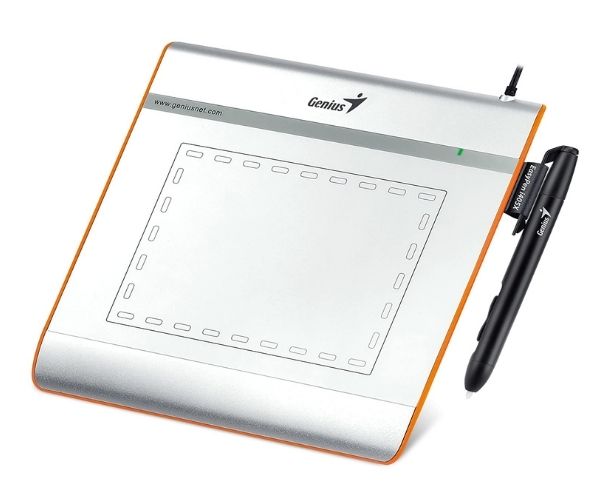
Discover a more natural and intuitive way to work on your computer with the brand new Genius EasyPen i405x Graphic Tablet. This is the perfect tool for anyone in Uganda looking to dive into digital art, graphic design, or simply make online work and teaching easier. Its compact 4" x 5.5" working area is ideal for desks with limited space and for carrying on the go, giving you a powerful creative canvas wherever you are.
Experience superior control and precision with the tablet's 1024 levels of pen pressure sensitivity. This allows you to create lines of varying thickness and opacity, just like you would with a real pen or brush. The included cordless pen is lightweight and battery-free, so you never have to worry about charging it. Boost your productivity with the 28 programmable hotkeys located around the drawing surface, allowing you to assign shortcuts to your most-used commands and functions in your favorite software.
Whether you're sketching, drawing, editing photos in Photoshop, taking notes during an online class, or signing digital documents, the EasyPen i405x makes it simple and efficient. It's a fantastic upgrade from a standard mouse, providing the accuracy needed for detailed creative work. This brand new, sealed unit is ready to plug in and transform your digital workflow right out of the box.
📖 HOW TO USE
1. Unbox your brand new Genius EasyPen i405x tablet and accessories.
2. Connect the tablet to an available USB port on your computer.
3. Visit the official Genius website to download and install the latest driver for your operating system (Windows or Mac).
4. Once the driver is installed, restart your computer to ensure it functions correctly.
5. Open your favorite design software and start creating! You can customize the hotkeys and pen buttons in the tablet settings panel.
💡 TIPS & CARE
• Always install the official driver from the Genius website to enable pressure sensitivity and customization.
• Calibrate your pen through the tablet software for better accuracy.
• Assign your most used keyboard shortcuts (like Undo, Zoom In/Out, Brush Size) to the tablet's hotkeys to speed up your workflow.
• Keep the tablet surface clean with a soft, dry cloth to ensure smooth pen movement and accurate tracking.